> ## Documentation Index
> Fetch the complete documentation index at: https://platform.minimax.io/docs/llms.txt
> Use this file to discover all available pages before exploring further.
# Introduction to the Model Context Protocol (MCP)
> This guide explains the Model Context Protocol (MCP) and its Python/JS tools for seamless multimodal AI integration.
We recommend using [MiniMax CLI](/token-plan/minimax-cli) instead of MCP for simpler setup and better experience.
The [Model Context Protocol (MCP)](https://modelcontextprotocol.io/docs/getting-started/intro) is an open protocol that standardizes how applications provide context to large language models (LLMs). It is similar to a USB‑C port for AI applications, offering a stable and standardized entry point so models can access databases, APIs, plugins, or other tools. With MCP tools, developers can let LLMs access various tools hosted on remote MCP servers.
MiniMax provides official [Python](https://github.com/MiniMax-AI/MiniMax-MCP) and [JavaScript](https://github.com/MiniMax-AI/MiniMax-MCP-JS) implementations of the MCP server, supporting multimodal capabilities such as text-to-speech (TTS), voice cloning, image generation, and video generation. Developers can self-host MCP services and access them from MCP clients (e.g., Claude Desktop, Cursor, Windsurf, OpenAI Agents) to quickly integrate voice, image, and video features. For transport, the Python version supports **stdio** and **SSE**, while the JavaScript version supports **stdio**, **REST**, and **SSE**.
## MiniMax MCP Tools and Parameters
### 1. text\_to\_audio
This tool converts the text to natural and fluent speech.
| Parameter | Description | Format / Notes | Default |
| :---------------- | :-------------------------------- | :----------------------------------------------------------------------------------------------------------------------------------------------------------------------------------------------------------------------------------------------------------------------------------------------------------------------------------------------------------------------------------------------------------- | :--------------------------- |
| text | Required. The text to synthesize. | String, max length \< 10,000 characters; use newline characters for paragraph breaks. | None |
| output\_directory | Directory for saving audio files. | String (file path). | Path from config file |
| voice\_id | Voice ID to use. | String, see [API documentation](/api-reference/speech-t2a-http) for available options. | "female-shaonv" |
| model | Model version to use. | String, see [API documentation](/api-reference/speech-t2a-http) for available options. | "speech-02-hd" |
| speed | Speed adjustment. | Float, range \[0.5, 2.0]. | 1.0 |
| vol | Playback volume. | Float, range (0, 10]. | 1.0 |
| pitch | Pitch adjustment. | Integer, range \[-12, 12]. | 0 (Output in original voice) |
| emotion | Emotional tone. | String, allowed values: \["happy", "sad", "angry", "fearful", "disgusted", "surprised", "calm", "fluent", "whipser"]; supported only by `speech-2.8-hd`, `speech-2.8-turbo`, `speech-2.6-hd`, `speech-2.6-turbo`, `speech-02-hd`, `speech-02-turbo`, `speech-01-turbo`, `speech-01-hd`. Option `fluent`, `whipser` support only by `speech-2.8-turbo`, `speech-2.8-hd`, `speech-2.6-turbo`, `speech-2.6-hd`. | happy |
| sample\_rate | Audio sample rate. | Integer, allowed: \[8000, 16000, 22050, 24000, 32000, 44100]. | 32000 |
| bitrate | Audio bitrate. | Integer, allowed: \[32000, 64000, 128000, 256000]; applies to mp3 only. | 128000 |
| channel | Number of channels. | Integer, 1 = mono, 2 = stereo. | 1 |
| format | Output audio format. | String, allowed: \["pcm", "mp3", "flac", "wav"]. | mp3 |
| language\_boost | Language-specific enhancement. | String, see [API documentation](/api-reference/speech-t2a-http) for available options. | null |
### 2. list\_voices
This tool lists all available voices.
| Parameter | Description | Format / Notes | Default |
| :---------- | :------------------ | :------------------------------------------------------------------------------------------------------------------------------------------------------------------------------------------------------------------------------------------- | :------ |
| voice\_type | Voice type to query | String, allowed: \[system (built-in voices), voice\_cloning (fast-cloned voices), voice\_generation (voices created by the text-to-voice API), music\_generation (vocal/accompaniment voices from music generation), all (all of the above)] | "all" |
### 3. voice\_clone
This tool clones a voice from a specified audio file.
| Parameter | Description | Format / Notes | Default |
| :---------------- | :---------------------------------- | :------------------------------------------------------------------------------------------------------------------------------------------------------------ | :-------------------- |
| voice\_id | Required. ID for the cloned voice. | String, rules: 1) Length \[8, 256]; 2) Must start with a letter; 3) Digits, letters, `-` and `_` allowed; 4) Must not end with `-` or `_`; 5) Must be unique. | None |
| file | Required. Audio file to clone from. | String, formats: \["mp3", "m4a", "wav"] | None |
| text | Demo text for the cloned voice. | String, no more than 2000 characters. | None |
| output\_directory | Directory to save audio files. | String (file path) | Path from config file |
| is\_url | Whether the source audio is a URL. | Boolean (True / False) | False |
### 4. voice\_design
This tool generates a voice and preview audio from a prompt.
| Parameter | Description | Format / Notes | Default |
| :---------------- | :---------------------------------------------- | :----------------- | :-------------------------- |
| prompt | Required. Description of the voice to generate. | String | None |
| preview\_text | Required. Text for preview audio. | String | None |
| voice\_id | Custom ID for the generated voice. | String | Auto-generated unique value |
| output\_directory | Directory to save preview audio. | String (file path) | Path from config file |
### 5. play\_audio
This tool plays an audio file.
| Parameter | Description | Format / Notes | Default |
| :---------------- | :----------------------------------------------------- | :------------------------ | :------ |
| input\_file\_path | Required. Local path or URL of the audio file to play. | String (file path or URL) | None |
| is\_url | Whether the audio source is a URL. | Boolean (True / False) | False |
### 6. music\_generation
This tool generates music from a prompt and lyrics.
| Parameter | Description | Format / Notes | Default |
| :---------------- | :-------------------------------------------------------------------- | :-------------------------------------------------------------------------------------------------------------------- | :--------------------- |
| prompt | Required. Inspiration for the composition (style, mood, scene, etc.). | String, 10–300 characters | None |
| lyrics | Required. Lyrics for generation. | String, lines separated by `\n`; supports `[Intro]`, `[Verse]`, `[Chorus]`, `[Bridge]`, `[Outro]`; 10–600 characters. | None |
| sample\_rate | Music sample rate. | Integer, allowed: \[16000, 24000, 32000, 44100] | 32000 |
| bitrate | Music bitrate. | Integer, allowed: \[32000, 64000, 128000, 256000] | 128000 |
| format | Music format. | String, allowed: \["mp3", "wav", "pcm"] | "mp3" |
| output\_directory | Directory to save music files. | String (file path) | Path from config file. |
### 7. generate\_video
Generates a video based on a prompt. At least one of `prompt` or `first_frame_image` in the parameters is required.
| Parameter | Description | Format and Notes | Default |
| :------------------ | :--------------------------- | :------------------------------------------------------------------------------------------------------------------------------------------------------------------------------------------------------------------------------------------------------------------------------------- | :--------------- |
| prompt | Video description | String, no more than 2000 characters | None |
| model | Model version | String, allowed values: \["MiniMax-Hailuo-02", "T2V-01-Director", "I2V-01-Director", "S2V-01", "I2V-01-live", "I2V-01", "T2V-01"] | "T2V-01" |
| first\_frame\_image | First frame image | Base64 string in `data:image/jpeg;base64,{data}` format, or a public URL | None |
| duration | Duration (seconds) | Integer, allowed \[6, 10]. Depends on model and resolution:
• 01 series (T2V-01, I2V-01, T2V-01-Director, I2V-01-live, S2V-01): 6
• 02 series (MiniMax-Hailuo-02):
512P: 6 or 10,
768P: 6 or 10,
1080P: 6 | 6 |
| resolution | Output resolution | String, depends on model & duration:
• 01 series(T2V-01, I2V-01, T2V-01-Director, I2V-01-live, S2V-01): fixed (6s → "720P")
• 02 series (MiniMax-Hailuo-02):
6s default "768P", allowed \["512P","768P","1080P"];
10s default "768P", allowed \["512P","768P"] | None |
| output\_directory | Save path for videos | String (file path) | Config file path |
| async\_mode | Async mode (returns task ID) | Boolean (True / False) | False |
### 8. image\_to\_video
Generates a video from a first-frame image. At least one of `prompt` or `first_frame_image` in the parameters is required. Only available in the **JavaScript/TypeScript MCP** version.
| Parameter | Description | Format and Notes | Default |
| :------------------ | :--------------------------- | :-------------------------------------------------------------------------------------------------------------------------------- | :--------------- |
| prompt | Video description | String, no more than 2000 characters | None |
| model | Model version | String, allowed values: \["MiniMax-Hailuo-02", "T2V-01-Director", "I2V-01-Director", "S2V-01", "I2V-01-live", "I2V-01", "T2V-01"] | "T2V-01" |
| first\_frame\_image | First frame image | Base64 string in `data:image/jpeg;base64,{data}` format, or a public URL | None |
| output\_directory | Save path for videos | String (file path) | Config file path |
| async\_mode | Async mode (returns task ID) | Boolean (True / False) | False |
### 9. query\_video\_generation
Queries the status of an asynchronous video generation task.
| Parameter | Description | Format and Notes | Default |
| :---------------- | :------------------------- | :----------------- | :--------------- |
| task\_id | Required. Task ID to query | String | None |
| output\_directory | Directory to save videos | String (file path) | Config file path |
### 10. text\_to\_image
Generates images from a text prompt.
| Parameter | Description | Format and Notes | Default |
| :---------------- | :--------------------------- | :----------------------------------------------------------------------------------- | :--------------- |
| prompt | Required. Image description | String, no more than 1500 characters | None |
| model | Model version | String, allowed values: \["image-01", "image-01-live"] | "image-01" |
| aspect\_ratio | Output aspect ratio | String, allowed values: \["1:1", "16:9", "4:3", "3:2", "2:3", "3:4", "9:16", "21:9"] | "1:1" |
| n | Number of images per request | Integer, range \[1, 9] | 1 |
| prompt\_optimizer | Auto-optimize prompt | Boolean (True / False) | True |
| output\_directory | Directory to save images | String (file path) | Config file path |
## Use the MiniMax MCP Server in Clients
### Get an API Key
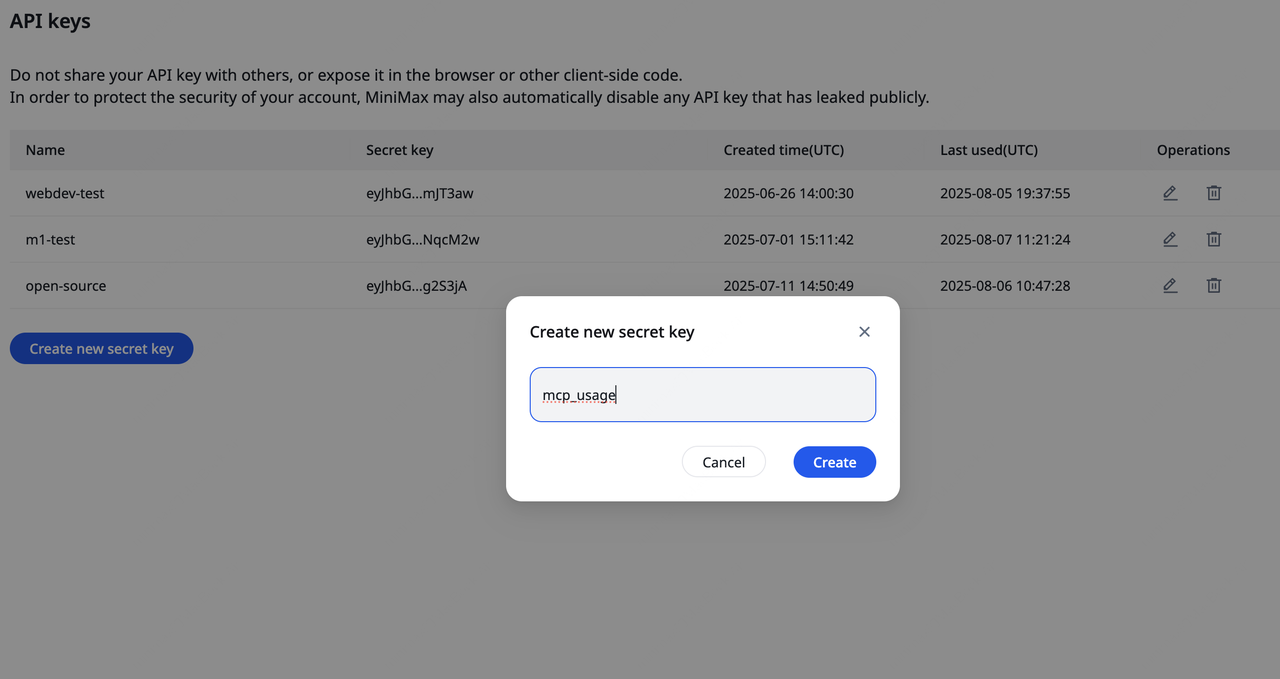
1. Visit the [MiniMax Developer Platform](https://platform.minimax.io/user-center/payment/token-plan).
2. Click the **"Create new secret key"** button and enter a project name to create a new API Key.
3. After creation, the system will display the API Key. **Be sure to copy and save it securely**. The key is **shown only once** and cannot be viewed again.
### UVX Installation and Configuration
MiniMax‑MCP is a Python-implemented MCP service. To allow MCP clients to call it, the service must be started and executed via `uvx`. `uvx` is a command-line tool provided by `uv`, similar to `npm exec`. It is used to run executables defined within a package, ensuring environment isolation and dependency control.
1. Install uv (to get uvx)
* macOS / Linux users:
```bash theme={null}
curl -LsSf https://astral.sh/uv/install.sh | sh
```
* Windows users:
```bash theme={null}
powershell -ExecutionPolicy ByPass -c "irm https://astral.sh/uv/install.ps1 | iex"
```
Other installation methods can be found in the [uv repository](https://github.com/astral-sh/uv). After installation, `uv` and `uvx` executables will be created under the Python environment's Scripts or bin directory.
2. Verify uvx is available Run the following command:
* macOS / Linux users:
```bash theme={null}
which uvx
```
* Windows users:
```bash theme={null}
(Get-Command uvx).source
```
* If installed correctly, a path will be shown (e.g., /usr/local/bin/uvx).
* If you encounter the error `spawn uvx ENOENT`, it means that `uvx` is either not installed or not in your system PATH. You need to provide its absolute path.
### Transport Modes
MiniMax-MCP provides two transport modes: studio and SSE. Choose as needed.
| Mode | stdio (default) | SSE |
| :------------ | :---------------------------------------- | :---------------------------------------------- |
| Runtime | Local only | Local or cloud deployment |
| Communication | Via `standard I/O` | Via `server-sent events` |
| Use Case | Local MCP client integration | Applications requiring server push |
| Input | Supports `local files` or `URL` resources | When deployed in cloud, `URL` input recommended |
### Use in Claude Desktop
1. Download [Claude Desktop](https://claude.ai/download).
2. Go to `Claude > Settings > Developer > Edit Config > claude_desktop_config.json`, add the following configuration.
3. Restart Claude Desktop when finished. Note: If you're on Windows, enable "Developer mode" in Claude Desktop to use MCP servers. If you see the error `spawn uvx ENOENT`, set the absolute path to uvx in `"command"`.
```json theme={null}
{
"mcpServers": {
"MiniMax": {
"command": "uvx",
"args": ["minimax-mcp"],
"env": {
"MINIMAX_API_KEY": "Enter your API Key",
"MINIMAX_MCP_BASE_PATH": "Local output directory path, e.g., /User/xxx/Desktop",
"MINIMAX_API_HOST": "https://api.minimax.io",
"MINIMAX_API_RESOURCE_MODE": "Optional. Specifies how generated resources are exposed. Options: [url | local]. Default: url"
},
"transport": "Optional: transport mode. Options: [studio|SSE], default: studio"
}
}
}
```
### Use in Cursor
1. Download and install [Cursor](https://cursor.com/).
2. Go to `Cursor -> Preferences -> Cursor Settings -> Tools & Inrgrations -> MCP -> Add Custom MCP` to open the MCP tool config file.
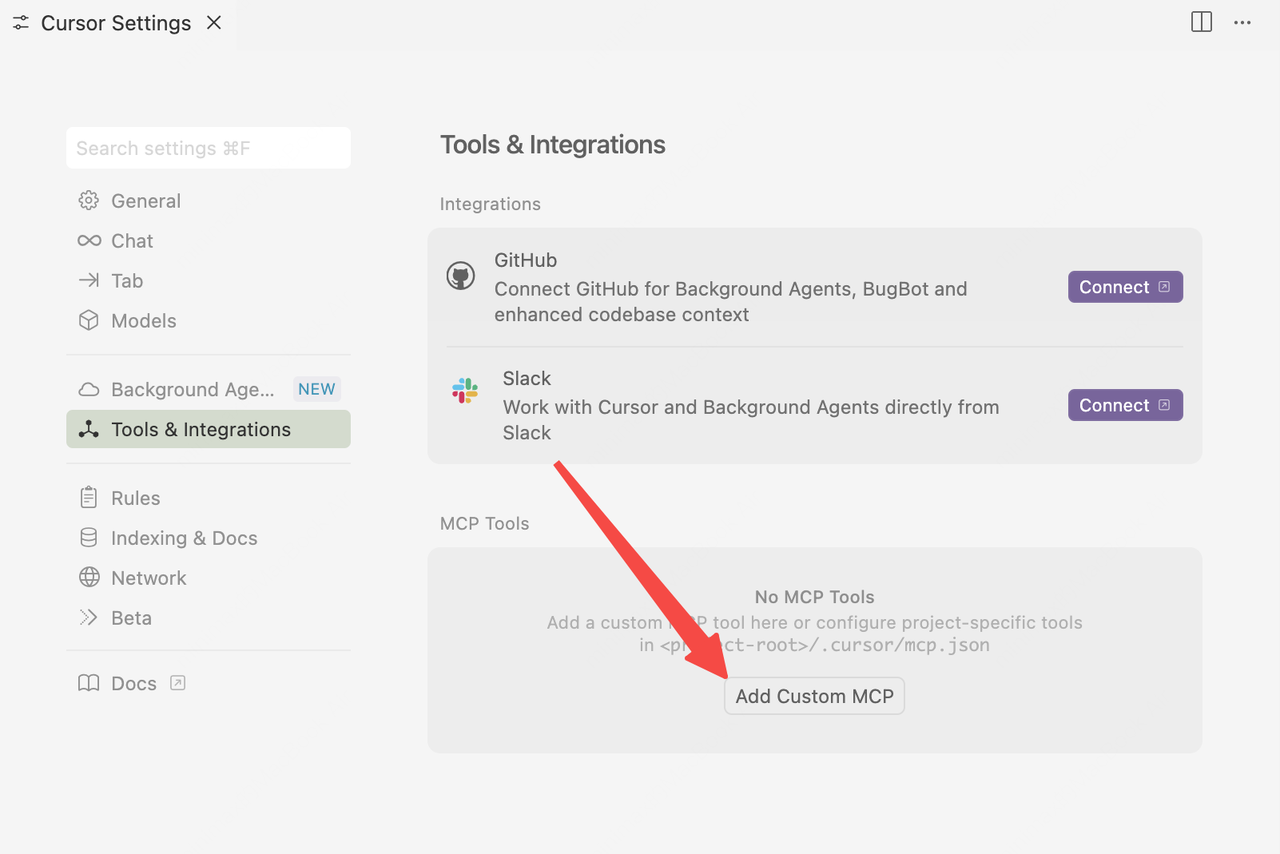
3. Add MiniMax account configuration in `mcp.json` file.
```json theme={null}
{
"mcpServers": {
"MiniMax": {
"command": "uvx",
"args": ["minimax-mcp"],
"env": {
"MINIMAX_API_KEY": "Enter your API Key",
"MINIMAX_MCP_BASE_PATH": "Local output directory path, e.g., /User/xxx/Desktop; ensure the path exists and is writable",
"MINIMAX_API_HOST": "https://api.minimax.io",
"MINIMAX_API_RESOURCE_MODE": "Optional. Specifies how generated resources are exposed. Options: [url | local]. Default: url"
},
"transport": "Optional: transport mode. Options: [studio|SSE], default: studio"
}
}
}
```
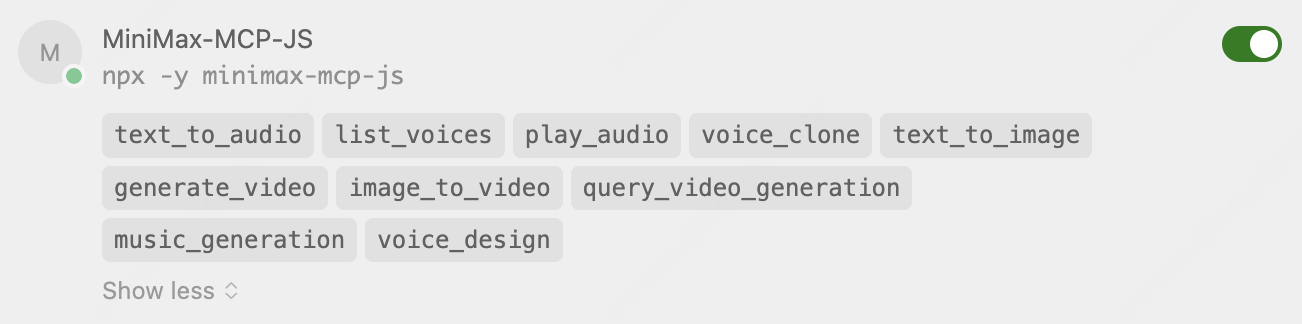
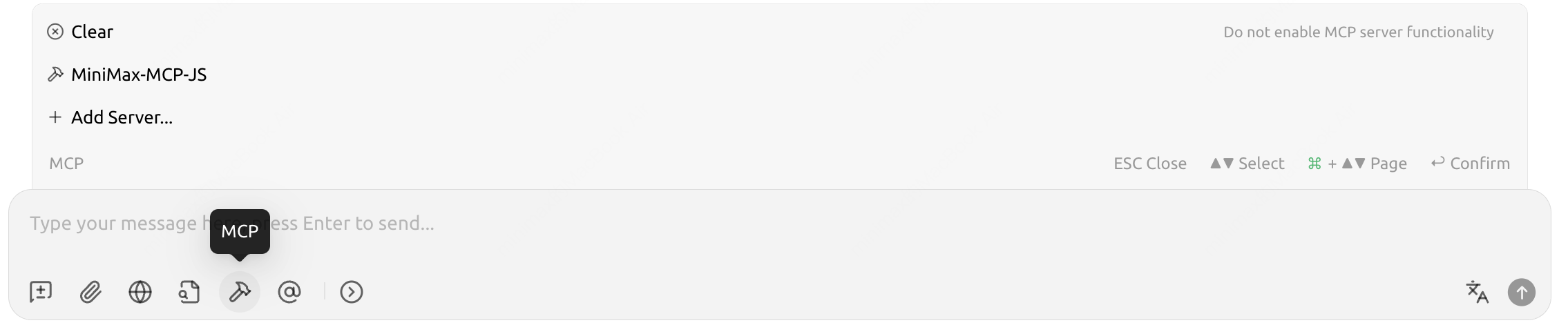
4. After configuration, you can view the MCP tools currently supported by MiniMax.
### Use in Cherry Studio
1. Download the [Cherry Studio client](https://www.cherry-ai.com/).
2. Go to `Settings -> MCP Settings -> Add Server -> Import from JSON`, paste the following and confirm.
```json theme={null}
{
"name": "minimax-mcp",
"isActive": true,
"command": "uvx",
"args": ["minimax-mcp"],
"env": {
"MINIMAX_API_KEY": "Enter your API Key",
"MINIMAX_MCP_BASE_PATH": "Local output directory path, e.g., /User/xxx/Desktop; ensure the path exists and is writable",
"MINIMAX_API_HOST": "https://api.minimax.io",
"MINIMAX_API_RESOURCE_MODE": "Optional. Specifies how generated resources are exposed. Options: [url | local]. Default: url"
},
"transport": "Optional: transport mode. Options: [studio|SSE], default: studio"
}
```
3. In the chat panel, click `MCP Settings` and select the configured "MiniMax MCP" to use it.
 # Use the MiniMax MCP JS Server in Clients
## Get an API Key
1. Visit the [MiniMax Developer Platform](https://platform.minimax.io/user-center/payment/token-plan).
2. Click the **"Create new secret key"** button and enter a project name to create a new API Key.
3. After creation, the system will display the API Key. **Be sure to copy and save it securely**. The key is **shown only once** and cannot be viewed again.

### Node.js and npm Installation
Node.js is an open-source JavaScript runtime that can run JavaScript outside the browser. It is based on Google’s V8 engine, with high performance, event-driven, and non-blocking I/O characteristics, making it suitable for high-concurrency network services, real-time apps, and microservices.
npm is the default package manager installed with Node.js and the world’s largest software registry. Developers can use npm to search, install, update, and manage dependencies (both frontend and backend), greatly simplifying development.
1. [Install Node.js and npm](https://nodejs.org/en/download)
2. Verify installation
Run the following commands; if installed correctly, it will display the versions of Node.js and npm
```bash theme={null}
node -v
npm -v
```
### Transport Modes
MiniMax-MCP-JS supports studio, REST, and SSE; choose as needed
| Mode | stdio (default) | REST | SSE |
| :------------ | :---------------------------------------- | :---------------------------------------------- | :---------------------------------------------- |
| Runtime | Local only | Local or cloud deployment | Local or cloud deployment |
| Communication | Via `standard I/O` | Via `HTTP requests` | Via `server-sent events` |
| Use Case | Local MCP client integration | API services, cross-language calls | Applications requiring server push |
| Input | Supports `local files` or `URL` resources | When deployed in cloud, `URL` input recommended | When deployed in cloud, `URL` input recommended |
### Use in Claude Desktop
1. Download [Claude Desktop](https://claude.ai/download).
2. Go to `Claude > Settings > Developer > Edit Config > claude_desktop_config.json`, add the following configuration.
3. Restart Claude Desktop when finished. Note: If you're on Windows, enable "Developer mode" in Claude Desktop to use MCP servers. If you see the error `spawn uvx ENOENT`, set the absolute path to uvx in `"command"`.
```json theme={null}
{
"mcpServers": {
"minimax-mcp-js": {
"command": "npx",
"args": ["-y", "minimax-mcp-js"],
"env": {
"MINIMAX_API_HOST": "https://api.minimax.io",
"MINIMAX_API_KEY": "",
"MINIMAX_MCP_BASE_PATH": "",
"MINIMAX_RESOURCE_MODE": ""
},
"transport": "Optional: transport mode [studio|REST|SSE], default studio"
}
}
}
```
### Use in Cursor
1. Download and install [Cursor](https://cursor.com/).
2. Go to `Cursor -> Preferences -> Cursor Settings -> Tools & Inrgrations -> MCP -> Add Custom MCP` to open the MCP tool config file.

3. Add MiniMax account configuration in `mcp.json` file.
```json theme={null}
{
"mcpServers": {
"MiniMax-MCP-JS": {
"command": "npx",
"args": ["-y", "minimax-mcp-js"],
"env": {
"MINIMAX_API_KEY": "Enter your API Key",
"MINIMAX_MCP_BASE_PATH": "Local output directory path, e.g., /User/xxx/Desktop; ensure the path exists and is writable",
"MINIMAX_API_HOST": "https://api.minimax.io",
"MINIMAX_API_RESOURCE_MODE": "Optional: how to expose generated resources, [url|local], default url"
},
"transport": "Optional: transport mode [studio|REST|SSE], default studio"
}
}
}
```
4. After configuration, you can view the MCP tools currently supported by MiniMax.
# Use the MiniMax MCP JS Server in Clients
## Get an API Key
1. Visit the [MiniMax Developer Platform](https://platform.minimax.io/user-center/payment/token-plan).
2. Click the **"Create new secret key"** button and enter a project name to create a new API Key.
3. After creation, the system will display the API Key. **Be sure to copy and save it securely**. The key is **shown only once** and cannot be viewed again.

### Node.js and npm Installation
Node.js is an open-source JavaScript runtime that can run JavaScript outside the browser. It is based on Google’s V8 engine, with high performance, event-driven, and non-blocking I/O characteristics, making it suitable for high-concurrency network services, real-time apps, and microservices.
npm is the default package manager installed with Node.js and the world’s largest software registry. Developers can use npm to search, install, update, and manage dependencies (both frontend and backend), greatly simplifying development.
1. [Install Node.js and npm](https://nodejs.org/en/download)
2. Verify installation
Run the following commands; if installed correctly, it will display the versions of Node.js and npm
```bash theme={null}
node -v
npm -v
```
### Transport Modes
MiniMax-MCP-JS supports studio, REST, and SSE; choose as needed
| Mode | stdio (default) | REST | SSE |
| :------------ | :---------------------------------------- | :---------------------------------------------- | :---------------------------------------------- |
| Runtime | Local only | Local or cloud deployment | Local or cloud deployment |
| Communication | Via `standard I/O` | Via `HTTP requests` | Via `server-sent events` |
| Use Case | Local MCP client integration | API services, cross-language calls | Applications requiring server push |
| Input | Supports `local files` or `URL` resources | When deployed in cloud, `URL` input recommended | When deployed in cloud, `URL` input recommended |
### Use in Claude Desktop
1. Download [Claude Desktop](https://claude.ai/download).
2. Go to `Claude > Settings > Developer > Edit Config > claude_desktop_config.json`, add the following configuration.
3. Restart Claude Desktop when finished. Note: If you're on Windows, enable "Developer mode" in Claude Desktop to use MCP servers. If you see the error `spawn uvx ENOENT`, set the absolute path to uvx in `"command"`.
```json theme={null}
{
"mcpServers": {
"minimax-mcp-js": {
"command": "npx",
"args": ["-y", "minimax-mcp-js"],
"env": {
"MINIMAX_API_HOST": "https://api.minimax.io",
"MINIMAX_API_KEY": "",
"MINIMAX_MCP_BASE_PATH": "",
"MINIMAX_RESOURCE_MODE": ""
},
"transport": "Optional: transport mode [studio|REST|SSE], default studio"
}
}
}
```
### Use in Cursor
1. Download and install [Cursor](https://cursor.com/).
2. Go to `Cursor -> Preferences -> Cursor Settings -> Tools & Inrgrations -> MCP -> Add Custom MCP` to open the MCP tool config file.

3. Add MiniMax account configuration in `mcp.json` file.
```json theme={null}
{
"mcpServers": {
"MiniMax-MCP-JS": {
"command": "npx",
"args": ["-y", "minimax-mcp-js"],
"env": {
"MINIMAX_API_KEY": "Enter your API Key",
"MINIMAX_MCP_BASE_PATH": "Local output directory path, e.g., /User/xxx/Desktop; ensure the path exists and is writable",
"MINIMAX_API_HOST": "https://api.minimax.io",
"MINIMAX_API_RESOURCE_MODE": "Optional: how to expose generated resources, [url|local], default url"
},
"transport": "Optional: transport mode [studio|REST|SSE], default studio"
}
}
}
```
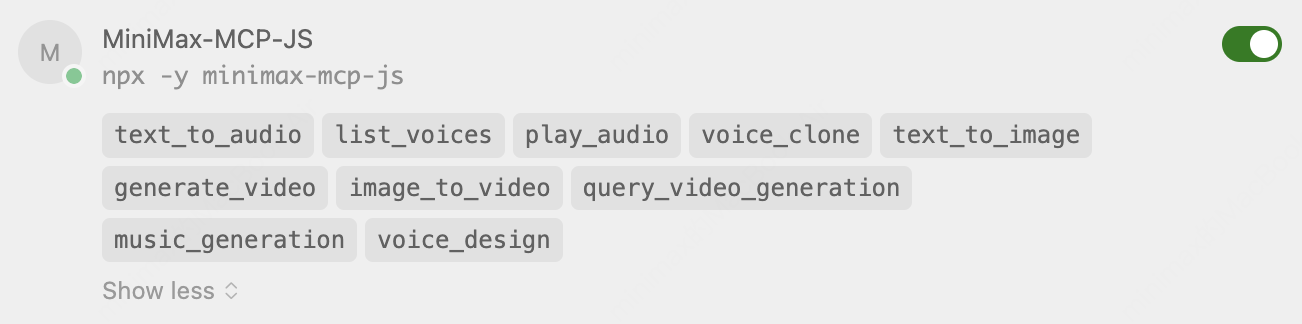
4. After configuration, you can view the MCP tools currently supported by MiniMax.
 ### Use in Cherry Studio
1. Download the [Cherry Studio client](https://www.cherry-ai.com/).
2. Go to `Settings -> MCP Settings -> Add Server -> Import from JSON`, paste the following and confirm.
```json theme={null}
{
"name": "MiniMax-MCP-JS",
"isActive": true,
"command": "npx",
"args": ["-y", "minimax-mcp-js"],
"env": {
"MINIMAX_API_KEY": "Enter your API Key",
"MINIMAX_MCP_BASE_PATH": "Local output directory path, e.g., /User/xxx/Desktop; ensure the path exists and is writable",
"MINIMAX_API_HOST": "https://api.minimax.io",
"MINIMAX_API_RESOURCE_MODE": "Optional: how to expose generated resources, [url|local], default url"
},
"transport": "Optional: transport mode [studio|REST|SSE], default studio"
}
```
3. In the chat panel, click `MCP Settings` and select the configured "MiniMax-MCP-JS" to use it.
### Use in Cherry Studio
1. Download the [Cherry Studio client](https://www.cherry-ai.com/).
2. Go to `Settings -> MCP Settings -> Add Server -> Import from JSON`, paste the following and confirm.
```json theme={null}
{
"name": "MiniMax-MCP-JS",
"isActive": true,
"command": "npx",
"args": ["-y", "minimax-mcp-js"],
"env": {
"MINIMAX_API_KEY": "Enter your API Key",
"MINIMAX_MCP_BASE_PATH": "Local output directory path, e.g., /User/xxx/Desktop; ensure the path exists and is writable",
"MINIMAX_API_HOST": "https://api.minimax.io",
"MINIMAX_API_RESOURCE_MODE": "Optional: how to expose generated resources, [url|local], default url"
},
"transport": "Optional: transport mode [studio|REST|SSE], default studio"
}
```
3. In the chat panel, click `MCP Settings` and select the configured "MiniMax-MCP-JS" to use it.
 ## Usage Examples
### Audio tools
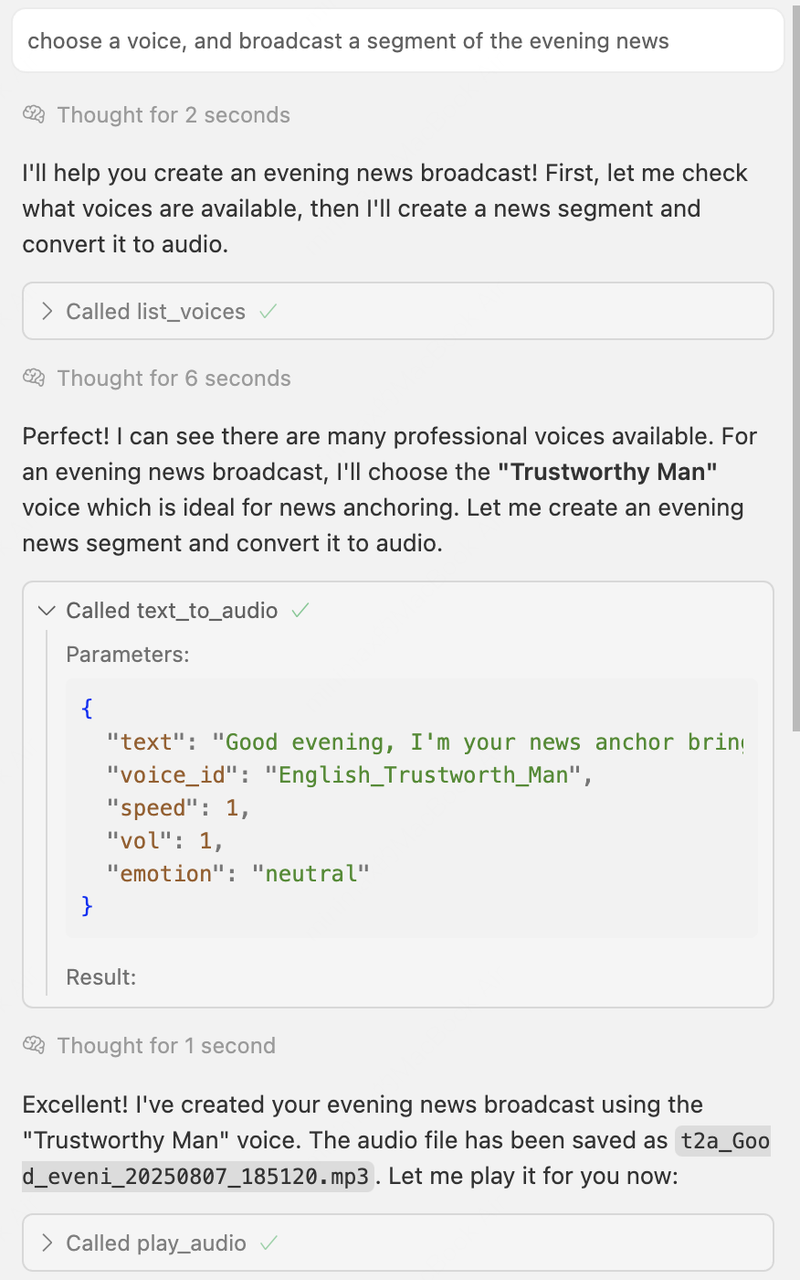
1. Choose suitable voice information and broadcast an evening news segment.
Reference prompt:
```text theme={null}
choose a voice, and broadcast a segment of the evening news.
```
Generated content:
Thinking process:
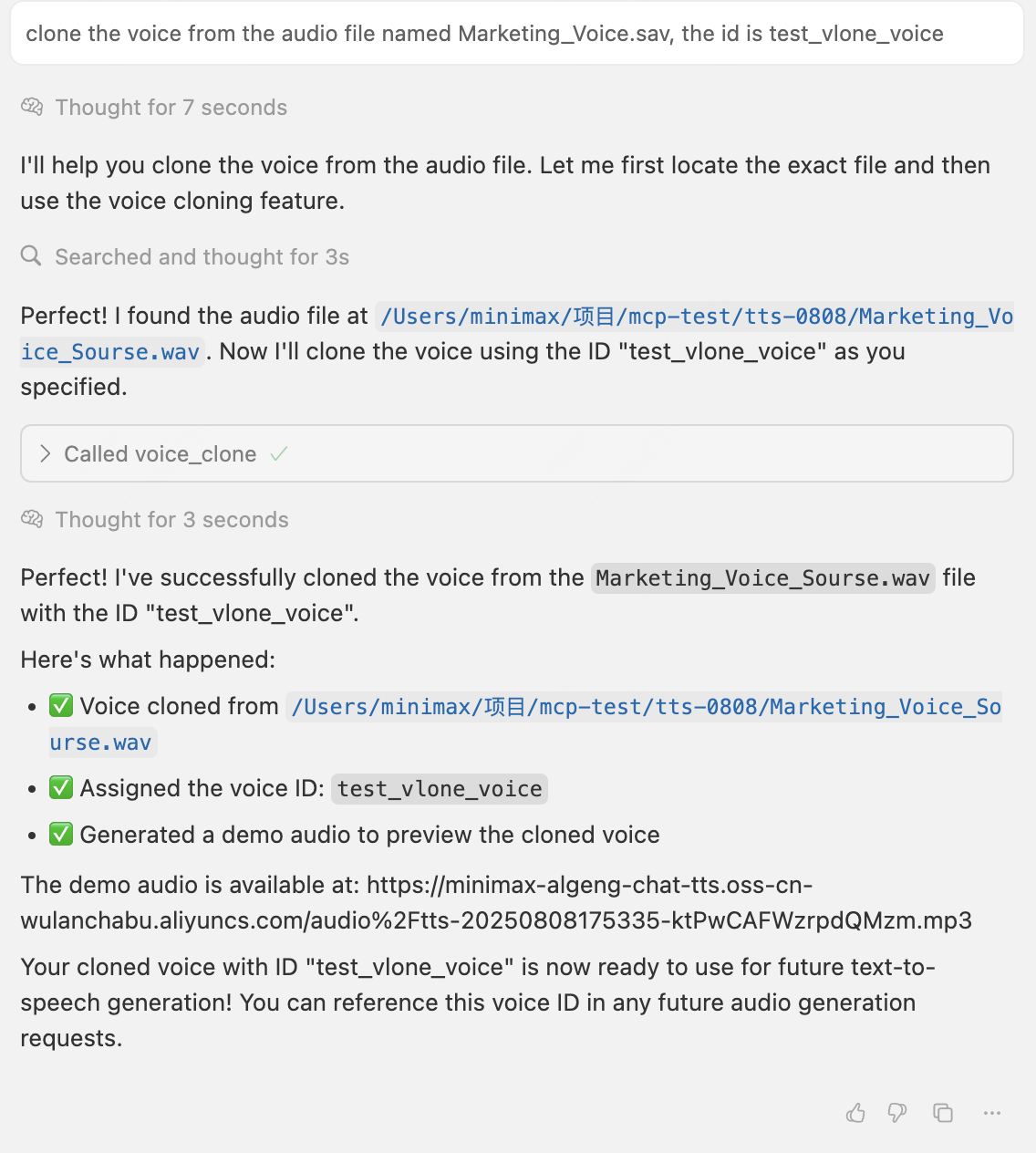
2. Clone a voice from a specified audio and specify the cloned voice ID. Reference prompt:
```text theme={null}
clone the voice from the audio file named Marketing_Voice.sav, the id is test_vlone_voice.
```
Source audio:
Result audio:
Thinking process:
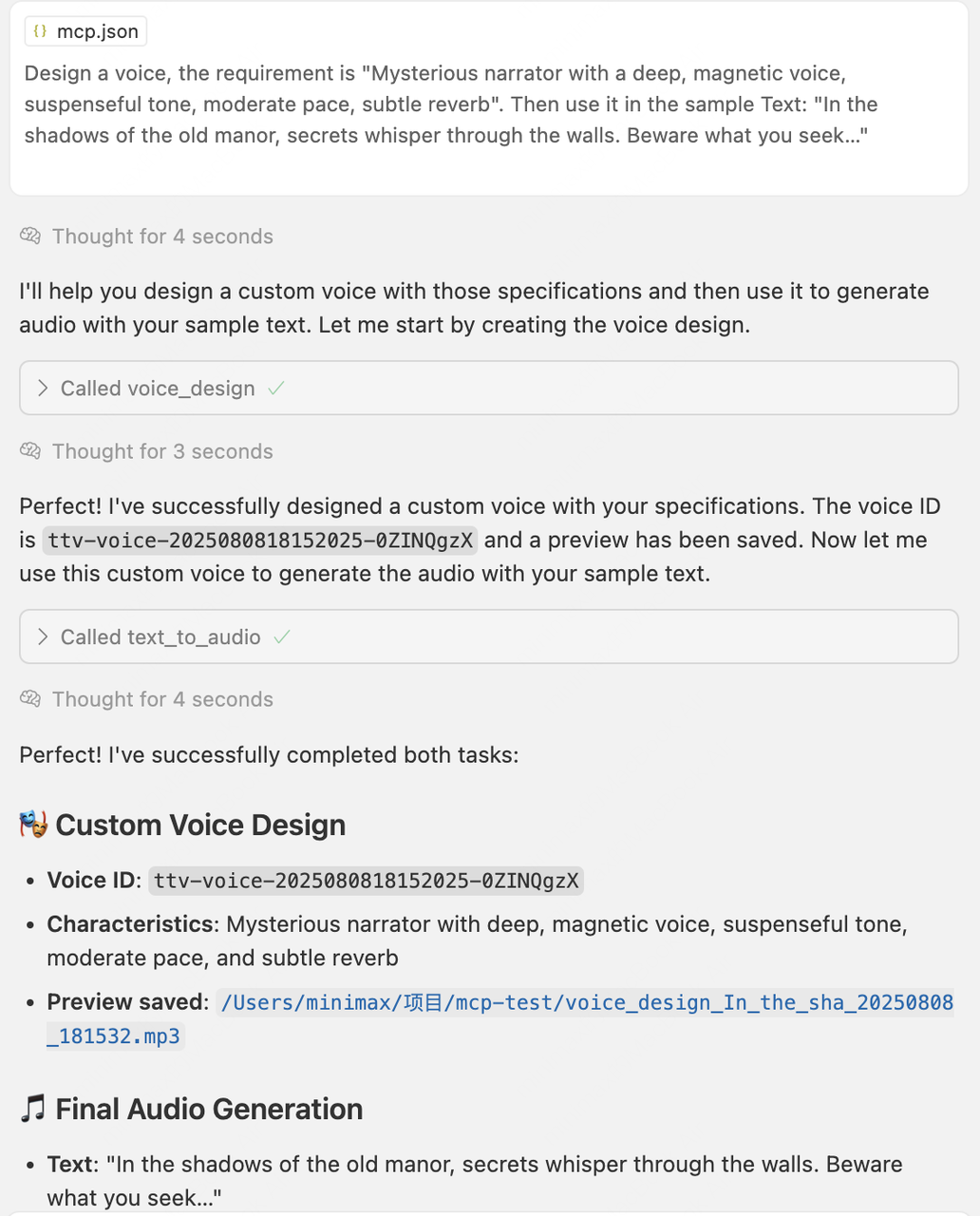
3. Design a voice as required and generate audio using the sample text.
Reference prompt:
```text theme={null}
Design a voice, the requirement is "Mysterious narrator with a deep, magnetic voice, suspenseful tone, moderate pace, subtle reverb". Then use it in the sample Text: "In the shadows of the old manor, secrets whisper through the walls. Beware what you seek…"
```
Generated content:
Thinking process:
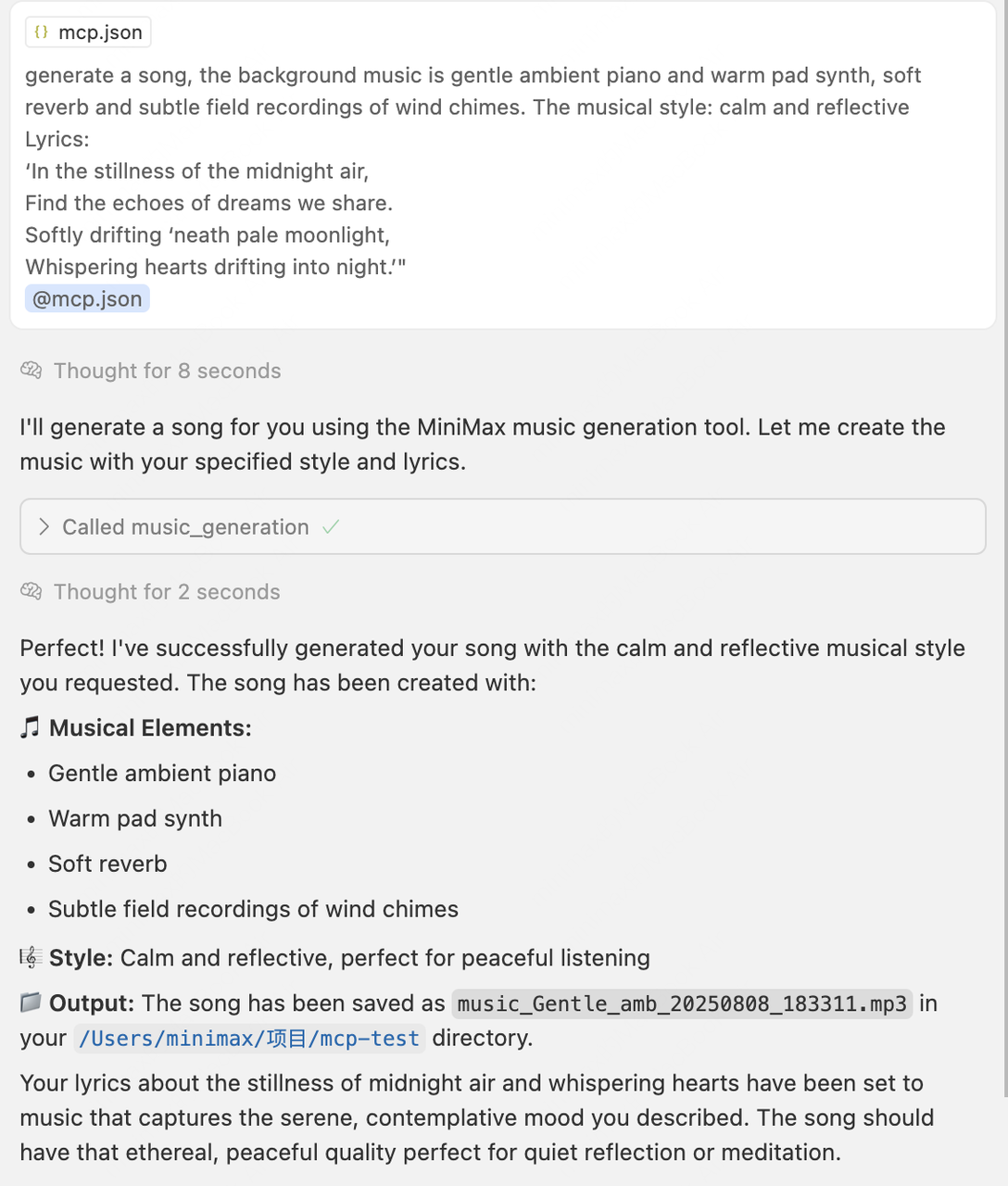
## Music generation tool
Reference prompt:
```text theme={null}
generate a song, the background music is gentle ambient piano and warm pad synth, soft reverb and subtle field recordings of wind chimes. The musical style: calm and reflective Lyrics: 'In the stillness of the midnight air, Find the echoes of dreams we share. Softly drifting 'neath pale moonlight, Whispering hearts drifting into night.'"
```
Generated content:
Thinking process
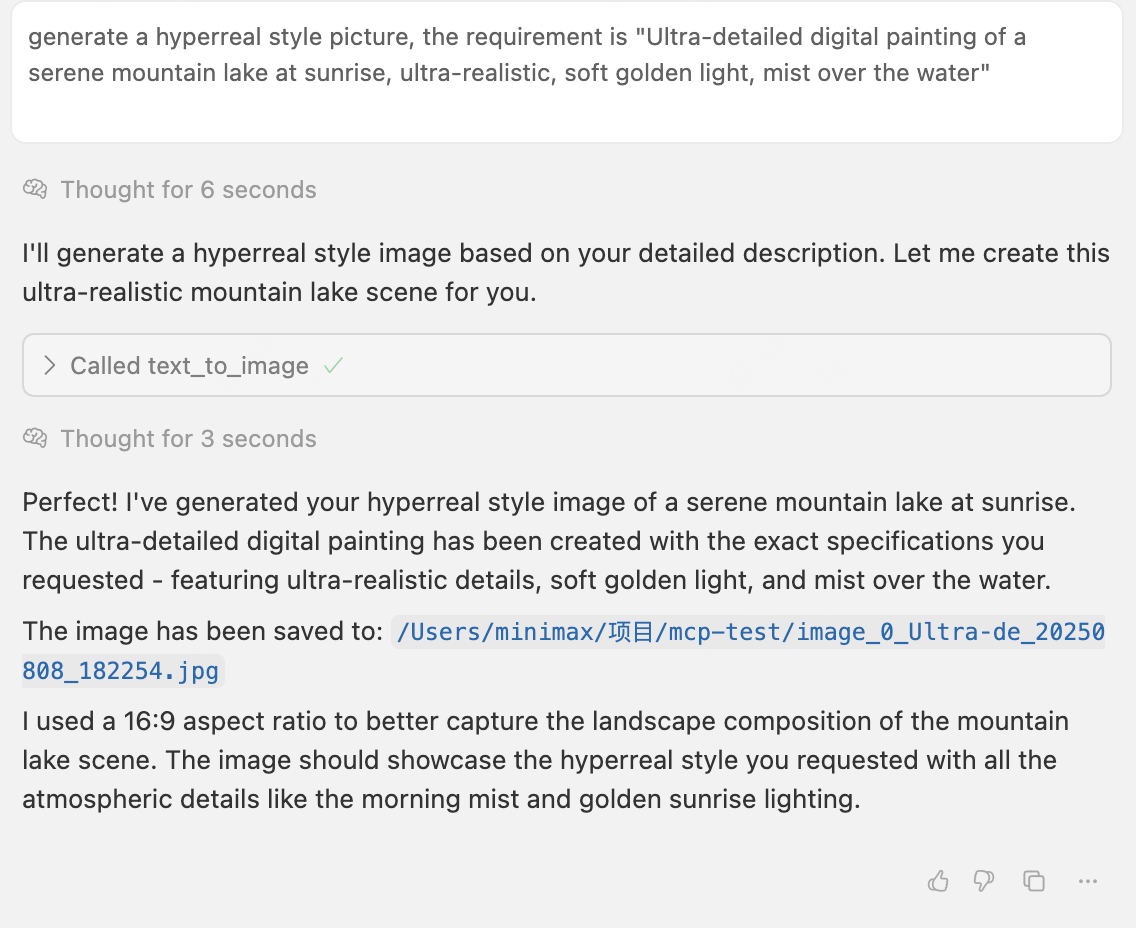
## Image generation tool
Reference prompt:
```text theme={null}
generate a hyperreal style picture, the requirement is "Ultra‑detailed digital painting of a serene mountain lake at sunrise, ultra-realistic, soft golden light, mist over the water"
```
Generated content:

Thinking process:
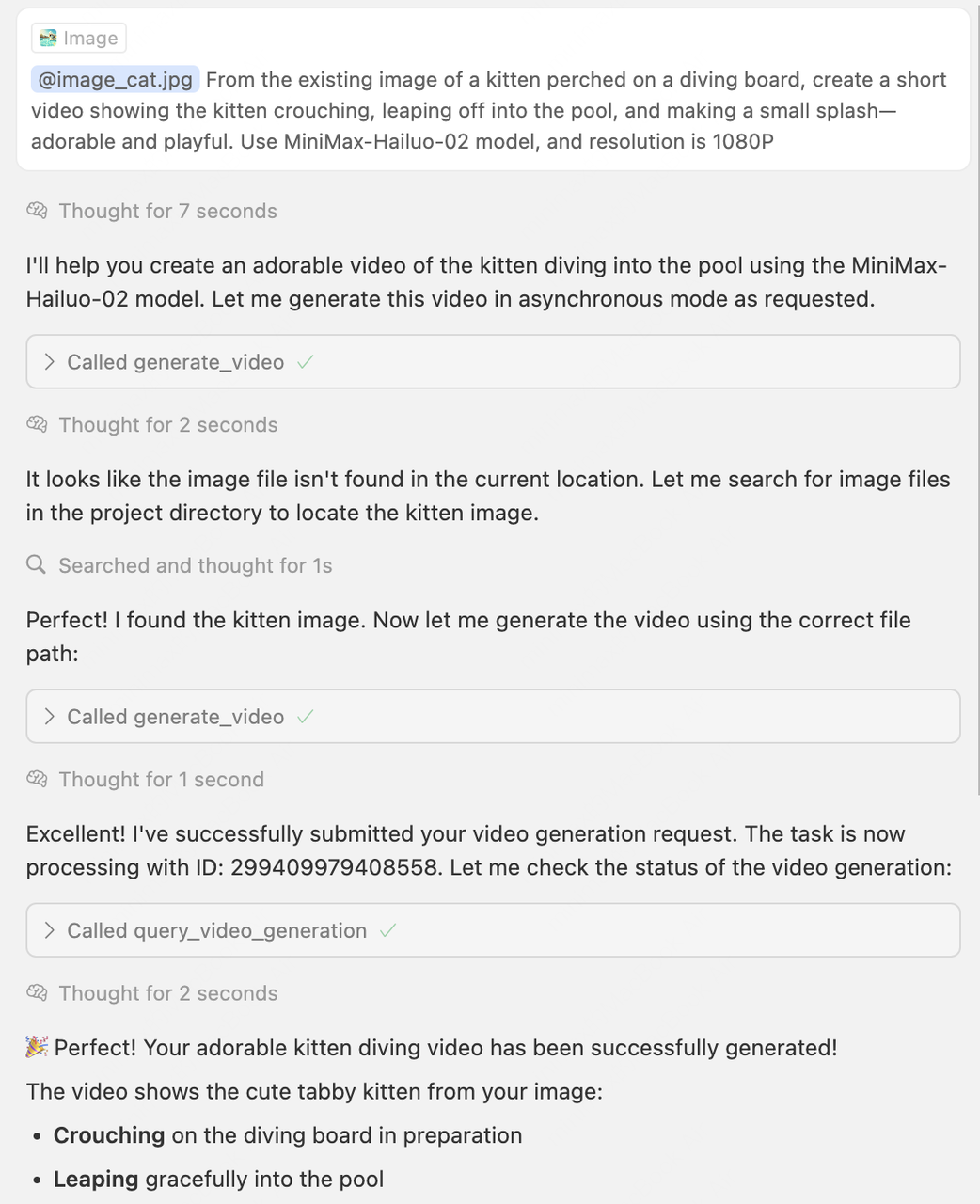
## Video generation tool
Reference prompt and image:
```text theme={null}
From the existing image of a kitten perched on a diving board, create a short video showing the kitten crouching, leaping off into the pool, and making a small splash—adorable and playful. Use MiniMax-Hailuo-02 model, and resolution is 1080P
```

Generated content:
Thinking process:
## How to contribute
If you would like to contribute to the MiniMax MCP project—whether by adding improvements or fixing bugs—you can do so in the following ways:
1. **Open a new Issue** on the GitHub repository ([Python version](https://github.com/MiniMax-AI/MiniMax-MCP) or [JS version](https://github.com/MiniMax-AI/MiniMax-MCP-JS)) and briefly describe the change you propose or the problem you encountered.
2. **Create a Pull Request (PR)** after receiving feedback, following the project’s contribution guidelines. Include a clear description of your changes and any relevant context.
3. **PR Review:** Project maintainers will review your submission and provide suggestions for merging or request further revisions if necessary.
## Usage Examples
### Audio tools
1. Choose suitable voice information and broadcast an evening news segment.
Reference prompt:
```text theme={null}
choose a voice, and broadcast a segment of the evening news.
```
Generated content:
Thinking process:

2. Clone a voice from a specified audio and specify the cloned voice ID. Reference prompt:
```text theme={null}
clone the voice from the audio file named Marketing_Voice.sav, the id is test_vlone_voice.
```
Source audio:
Result audio:
Thinking process:

3. Design a voice as required and generate audio using the sample text.
Reference prompt:
```text theme={null}
Design a voice, the requirement is "Mysterious narrator with a deep, magnetic voice, suspenseful tone, moderate pace, subtle reverb". Then use it in the sample Text: "In the shadows of the old manor, secrets whisper through the walls. Beware what you seek…"
```
Generated content:
Thinking process:

## Music generation tool
Reference prompt:
```text theme={null}
generate a song, the background music is gentle ambient piano and warm pad synth, soft reverb and subtle field recordings of wind chimes. The musical style: calm and reflective Lyrics: 'In the stillness of the midnight air, Find the echoes of dreams we share. Softly drifting 'neath pale moonlight, Whispering hearts drifting into night.'"
```
Generated content:
Thinking process

## Image generation tool
Reference prompt:
```text theme={null}
generate a hyperreal style picture, the requirement is "Ultra‑detailed digital painting of a serene mountain lake at sunrise, ultra-realistic, soft golden light, mist over the water"
```
Generated content:

Thinking process:

## Video generation tool
Reference prompt and image:
```text theme={null}
From the existing image of a kitten perched on a diving board, create a short video showing the kitten crouching, leaping off into the pool, and making a small splash—adorable and playful. Use MiniMax-Hailuo-02 model, and resolution is 1080P
```

Generated content:
Thinking process:

## How to contribute
If you would like to contribute to the MiniMax MCP project—whether by adding improvements or fixing bugs—you can do so in the following ways:
1. **Open a new Issue** on the GitHub repository ([Python version](https://github.com/MiniMax-AI/MiniMax-MCP) or [JS version](https://github.com/MiniMax-AI/MiniMax-MCP-JS)) and briefly describe the change you propose or the problem you encountered.
2. **Create a Pull Request (PR)** after receiving feedback, following the project’s contribution guidelines. Include a clear description of your changes and any relevant context.
3. **PR Review:** Project maintainers will review your submission and provide suggestions for merging or request further revisions if necessary.