> ## Documentation Index
> Fetch the complete documentation index at: https://platform.minimax.io/docs/llms.txt
> Use this file to discover all available pages before exploring further.
# Claude Code
> Use the latest MiniMax M-series models for AI programming in Claude Code.
[**Claude Code**](https://github.com/anthropics/claude-code) is Anthropic's official terminal-native coding agent powered by Claude.
## Install Claude Code
Refer to the [Claude Code documentation](https://code.claude.com/docs/en/setup) for installation.
## Configure MiniMax API
**Important: Clear Anthropic Environment Variables Before Configuration**
Before configuring, ensure you clear the following Anthropic-related environment variables to avoid conflicts with MiniMax API:
* `ANTHROPIC_AUTH_TOKEN`
* `ANTHROPIC_BASE_URL`
```bash theme={null}
unset ANTHROPIC_AUTH_TOKEN
unset ANTHROPIC_BASE_URL
```
If you previously exported these in `~/.bashrc` or `~/.zshrc`, also remove the export lines there to prevent re-export in new shells.
1. Edit or create the Claude Code configuration file located at `~/.claude/settings.json`. In this file, add or update the `env` field as shown below.
* The `ANTHROPIC_BASE_URL` should be set based on your location: for international users, use `https://api.minimax.io/anthropic`; for users in China, use `https://api.minimaxi.com/anthropic`.
* Set `` to the API Key obtained from the [MiniMax Developer Platform](https://platform.minimax.io/user-center/payment/token-plan) (For users in China, visit [MiniMax Developer Platform](https://platform.minimaxi.com/user-center/payment/token-plan)).
* Note: Environment variables `ANTHROPIC_AUTH_TOKEN` and `ANTHROPIC_BASE_URL` take priority over `settings.json` configuration.
* `CLAUDE_CODE_AUTO_COMPACT_WINDOW` sets Claude Code's auto-compact threshold to 1000000 tokens, matching MiniMax-M3's current context window.
```json theme={null}
{
"env": {
"ANTHROPIC_BASE_URL": "https://api.minimax.io/anthropic",
"ANTHROPIC_AUTH_TOKEN": "",
"CLAUDE_CODE_AUTO_COMPACT_WINDOW": "1000000",
"ANTHROPIC_MODEL": "MiniMax-M3[1m]",
"ANTHROPIC_DEFAULT_SONNET_MODEL": "MiniMax-M3[1m]",
"ANTHROPIC_DEFAULT_OPUS_MODEL": "MiniMax-M3[1m]",
"ANTHROPIC_DEFAULT_HAIKU_MODEL": "MiniMax-M3[1m]"
}
}
```
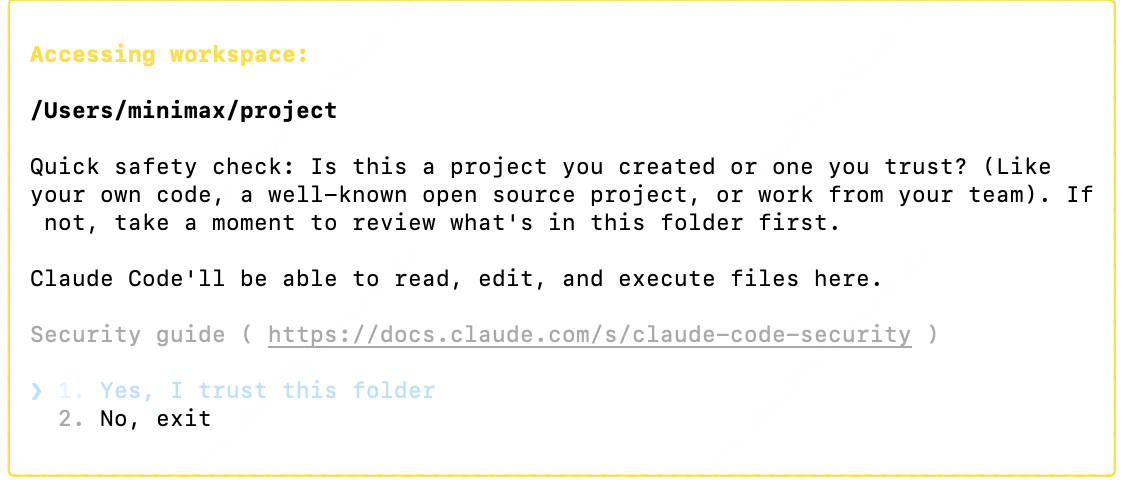
2. After completing the configuration, navigate to your working directory and run the `claude` command in the terminal to start using Claude Code. After startup, select **Trust This Folder** to allow it to access the files in your folder as shown below:
3. You can now start using Claude Code for development.
Important Note:
After completing the configuration, if you also want to enable Web Search capability, you will need to follow this [tutorial](https://platform.minimax.io/docs/token-plan/mcp-guide) to configure the Web Search MCP.
## Verify the Configuration
After starting `claude`, run the following slash commands inside the TUI to confirm Claude Code is using MiniMax instead of the default Claude provider:
```text theme={null}
/status
/model
```
* `/status` should show the `ANTHROPIC_BASE_URL` pointing to `api.minimax.io/anthropic` (or `api.minimaxi.com/anthropic` for users in China).
* `/model` should show the active model as `MiniMax-M3`.
MiniMax-M3 supports Claude Code's extended thinking, which is on by default — toggle it anytime with `Option+T` (macOS) or `Alt+T` (Windows/Linux), or via `/config`.