> ## Documentation Index
> Fetch the complete documentation index at: https://platform.minimax.io/docs/llms.txt
> Use this file to discover all available pages before exploring further.
# Hermes Agent ☤
> Use the latest MiniMax M-series models in Hermes Agent for autonomous AI-powered development.
[**Hermes Agent**](https://github.com/NousResearch/hermes-agent) is an open-source self-improving AI agent framework by Nous Research.
## Prerequisites
* A MiniMax [Subscription Key](https://platform.minimax.io/user-center/payment/token-plan) with Token Plan or Credits access
* A computer with terminal access (macOS, Linux, or Windows with WSL2)
***
 ## Install Hermes Agent
[Hermes Agent](https://github.com/NousResearch/hermes-agent) is an open-source, self-improving AI agent built by [Nous Research](https://nousresearch.com). It features persistent cross-session memory, a built-in learning loop, 40+ integrated tools, and multi-platform access (CLI, Telegram, Discord, Slack, WhatsApp).
Run the one-line installer in your terminal:
```bash theme={null}
curl -fsSL https://raw.githubusercontent.com/NousResearch/hermes-agent/main/scripts/install.sh | bash
```
Verify the installation:
```bash theme={null}
hermes doctor
```
For more information, refer to the [Hermes Agent documentation](https://hermes-agent.nousresearch.com/docs/).
## Configure MiniMax Token Plan
Hermes Agent has built-in support for MiniMax as a provider. Run the model selector:
```bash theme={null}
hermes model
```
1. Select **"MiniMax (global endpoint)"** from the provider list.
## Install Hermes Agent
[Hermes Agent](https://github.com/NousResearch/hermes-agent) is an open-source, self-improving AI agent built by [Nous Research](https://nousresearch.com). It features persistent cross-session memory, a built-in learning loop, 40+ integrated tools, and multi-platform access (CLI, Telegram, Discord, Slack, WhatsApp).
Run the one-line installer in your terminal:
```bash theme={null}
curl -fsSL https://raw.githubusercontent.com/NousResearch/hermes-agent/main/scripts/install.sh | bash
```
Verify the installation:
```bash theme={null}
hermes doctor
```
For more information, refer to the [Hermes Agent documentation](https://hermes-agent.nousresearch.com/docs/).
## Configure MiniMax Token Plan
Hermes Agent has built-in support for MiniMax as a provider. Run the model selector:
```bash theme={null}
hermes model
```
1. Select **"MiniMax (global endpoint)"** from the provider list.
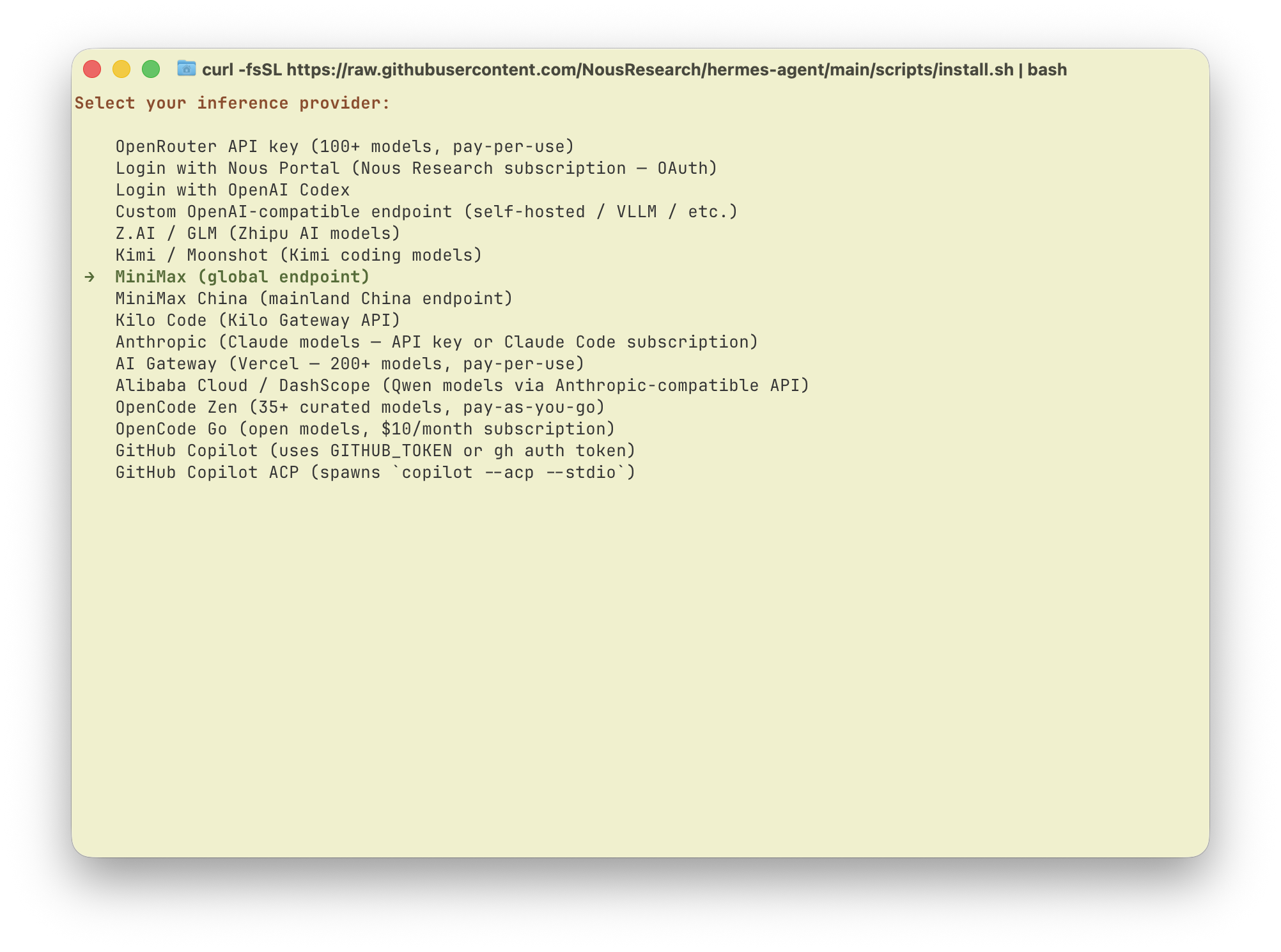 2. When prompted, enter your **Subscription Key** obtained from the [MiniMax Token Plan page](https://platform.minimax.io/user-center/payment/token-plan).
 3. Select **MiniMax-M3** as the model.
Don't have resources yet? View your Subscription Key on the [Token Plan page](https://platform.minimax.io/user-center/payment/token-plan), then buy a Token Plan subscription or Credits, or use resources assigned by your Team. Subscription Keys are different from pay-as-you-go API Keys.
## Start Using Hermes Agent
Run `hermes` to start talking with Hermes Agent powered by the latest MiniMax M-series models.
Hermes Agent's persistent memory and self-improving skills system means it gets better the more you use it — your coding patterns, project context, and preferences are remembered across sessions automatically.
## Toggle thinking
Toggle thinking at runtime with `/reasoning`: `none` turns it off, any other level (minimal/low/medium/high/xhigh) turns it on.
3. Select **MiniMax-M3** as the model.
Don't have resources yet? View your Subscription Key on the [Token Plan page](https://platform.minimax.io/user-center/payment/token-plan), then buy a Token Plan subscription or Credits, or use resources assigned by your Team. Subscription Keys are different from pay-as-you-go API Keys.
## Start Using Hermes Agent
Run `hermes` to start talking with Hermes Agent powered by the latest MiniMax M-series models.
Hermes Agent's persistent memory and self-improving skills system means it gets better the more you use it — your coding patterns, project context, and preferences are remembered across sessions automatically.
## Toggle thinking
Toggle thinking at runtime with `/reasoning`: `none` turns it off, any other level (minimal/low/medium/high/xhigh) turns it on.