The pages above walk through the most popular AI coding tools step-by-step. For other tools that accept a custom Base URL + API Key, use the values below.

Configuration Reference

MiniMax exposes two protocols. Pick whichever your tool supports — most modern tools support at least one.

OpenAI-Compatible Protocol

Anthropic-Compatible Protocol

Which Protocol Should I Pick?

Cherry Studio

Cherry Studio is an open-source desktop client supporting 50+ LLM providers, with built-in MCP servers and 300+ assistants.
1

Install

Install Cherry Studio per the official docs.
2

Add MiniMax provider

Open Cherry Studio → click Choose other Providers → search MiniMax, then pick MiniMax.
3

Enter API Key

Enter your Subscription Key (the API Host is prefilled), then click Check to verify.
4

Pick the model

Select MiniMax-M3 from the model list.

Xcode

Xcode is Apple’s official IDE for macOS, iOS, iPadOS, watchOS, and visionOS, now with built-in Coding Intelligence.
1

Install Xcode

Install Xcode 26 or later from the Mac App Store.
2

Add a Model Provider

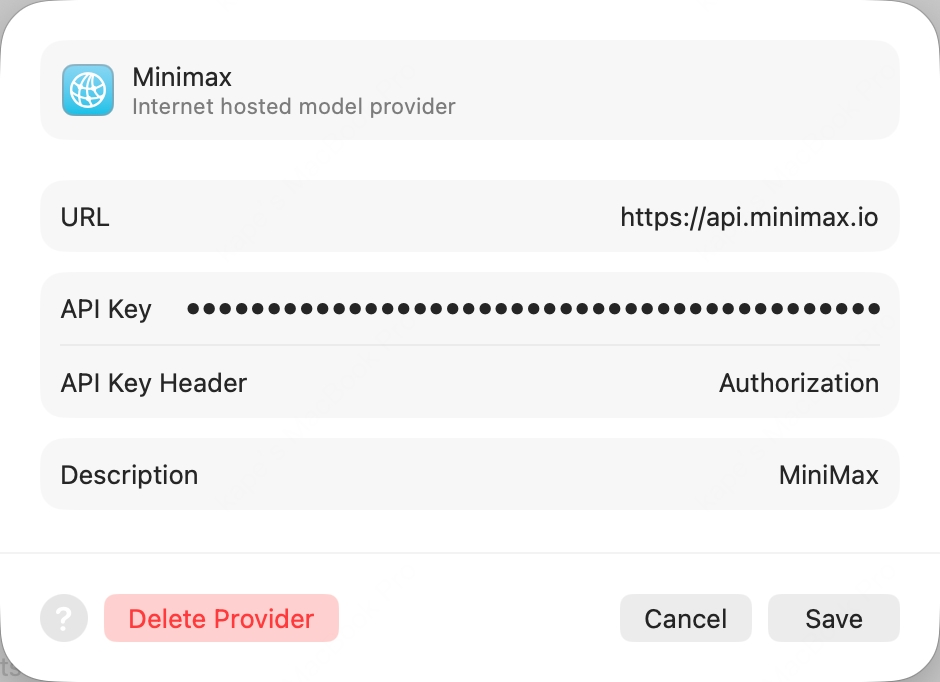
Open Xcode → top menu Xcode → Settings → Intelligence → Add a Model Provider, choose the Internet Hosted tab, and fill in:
  • URL: https://api.minimax.io (bare host, no path)
  • API Key Header: Authorization (override the default x-api-key)
  • API Key: Bearer <your Subscription Key> (the word Bearer, a single space, then your sk-cp-… key — get one here)
  • Description: MiniMax (any value)
Xcode Add a Model Provider dialog
3

Enable the model

Click Add. Back in the Intelligence pane, open the new MiniMax provider and enable MiniMax-M3.
4

Start chatting

Open any project, press ⌘+0 to bring up the Coding Assistant, click the edit icon at the top-left to pick MiniMax-M3.

Pi

Pi is an open-source TUI coding agent from earendil-works that talks to any provider through a unified LLM API.
1

Install Pi

2

Set env var and launch

Export your Subscription Key (prefix sk-cp-…) and launch Pi:

Kilo Code

Kilo Code is an open-source AI coding agent for VS Code, supporting multiple LLM providers and MCP servers.
First clear the ANTHROPIC_AUTH_TOKEN and ANTHROPIC_BASE_URL env vars — otherwise they will override the configuration.
1

Install the extension

Search Kilo Code in the VS Code Extensions panel and install.
2

Configure MiniMax provider

Open Kilo Code → Settings:
  • API Provider = MiniMax
  • MiniMax Entrypoint = api.minimax.io
  • MiniMax API Key = your Subscription Key
  • Model = MiniMax-M3
Click Save then Done.

Zed

Zed is an open-source, high-performance multiplayer code editor written in Rust by the Atom creators.
1

Install Zed

Install Zed per the official docs.
2

Add LLM Provider

Settings → LLM Provider+Add Provider → choose OpenAI, fill:
  • API URL = https://api.minimax.io/v1
  • API Key = from Token Plan
  • Model Name = MiniMax-M3
3

Re-confirm API Key

Click Save Provider. Then back in the LLM Provider list, click the new MiniMax entry, re-enter the API Key and press Enter to confirm.
4

Pick the model

Return to the agent panel, click Select a Model at the bottom-right and pick MiniMax-M3.

OpenCode

OpenCode is an open-source terminal AI coding agent by SST, with multi-provider support and LSP integration.
OpenCode has built-in MiniMax-M3 support — no config file needed.
1

Install OpenCode

2

Authenticate

Run opencode auth login, then when prompted, search and pick MiniMax Token Plan (minimax.io), and enter your Token Plan API Key.
3

Launch

Run opencode to start.

Grok CLI

Grok CLI is an open-source terminal coding agent that connects to xAI’s Grok and OpenAI-compatible providers.
Not recommended for Agent workflows — use Claude Code or Cursor for best results.
First clear the OPENAI_API_KEY and OPENAI_BASE_URL env vars.
1

Install Grok CLI

2

Set env vars and launch

Droid

Droid is Factory’s official terminal coding agent that integrates with IDEs and developer collaboration tools.
You must first clear the ANTHROPIC_AUTH_TOKEN env var (otherwise it overrides the API Key in config.json). Note the config file path is ~/.factory/config.json (not settings.json).
1

Install Droid

2

Edit config file

Edit ~/.factory/config.json:
3

Launch and pick model

Launch droid, then /model and pick MiniMax-M3.

Qwen Code

Qwen Code is Alibaba’s open-source terminal coding agent optimized for the Qwen model family.
1

Install Qwen Code

Linux / macOS:
Windows (works in both Command Prompt and PowerShell):
2

Launch and pick provider

Run qwen in your terminal. Pick Third-party ProvidersMiniMax API Key → region International.
3

Enter API Key

Enter your API Key from Token Plan (prefix sk-cp-…) and press Enter.
4

Confirm model IDs

The default model ID should be MiniMax-M3 — press Enter to submit and start chatting.

Open WebUI

Open WebUI is a self-hosted, open-source AI chat platform with offline support, RAG, and multi-model runners.
1

Install Open WebUI

Install via Python pip (requires Python 3.11 to avoid compatibility issues):
2

Create admin account

Open http://localhost:8080 in your browser and follow the prompt to create a local admin account.
3

Add OpenAI Connection

Click the avatar (top-right) → Admin Panel → top Settings tab → left Connections. In the OpenAI row, click ➕ Add Connection, fill:
  • URL: https://api.minimax.io/v1
  • Auth (Bearer mode): your API Key from Token Plan (prefix sk-cp-…)
4

Pick the model

Click Save and back in the chat view, pick MiniMax-M3 from the top model selector to start chatting.

nanobot

nanobot is an ultra-lightweight open-source personal AI agent CLI from HKUDS, with chat channels, memory, and MCP support.
1

Install nanobot

2

Initialize

3

Configure MiniMax in one shot

Replace sk-cp-... with your Token Plan API Key:
4

Launch

OpenHands

OpenHands (formerly OpenDevin) is an open-source AI software-development agent by All-Hands-AI, with TUI, web GUI, and IDE integrations.
1

Install OpenHands

2

Configure MiniMax in one shot

Replace sk-cp-... with your Token Plan API Key:
3

Launch

LangChain

LangChain is the open-source framework by LangChain Inc. for building LLM-powered applications, with model adapters, retrieval, agents, and tracing.
1

Install

2

Use MiniMax via the OpenAI-compatible adapter

Replace sk-cp-... with your Token Plan API Key: