

The pages above walk through the most popular AI coding tools step-by-step. For other tools that accept a custom Base URL + API Key, use the values below.Documentation Index
Fetch the complete documentation index at: https://platform.minimax.io/docs/llms.txt
Use this file to discover all available pages before exploring further.
Configuration Reference
MiniMax exposes two protocols. Pick whichever your tool supports — most modern tools support at least one.OpenAI-Compatible Protocol
| Field | Value |
|---|---|
| Provider | OpenAI Compatible (sometimes called Custom or OpenAI-format) |
| Base URL | https://api.minimax.io/v1 |
| API Key | Get Token Plan Key |
| Model ID | MiniMax-M2.7 or MiniMax-M2.7-highspeed |
Anthropic-Compatible Protocol
| Field | Value |
|---|---|
| Provider | Anthropic Compatible (sometimes called Claude or Custom Anthropic) |
| Base URL | https://api.minimax.io/anthropic |
| API Key | Get Token Plan Key |
| Model ID | MiniMax-M2.7 or MiniMax-M2.7-highspeed |
Which Protocol Should I Pick?
| Tool style | Recommended protocol | Typical env vars |
|---|---|---|
| Claude Code-style (TUI / CLI written for Anthropic) | Anthropic-Compatible | ANTHROPIC_BASE_URL + ANTHROPIC_AUTH_TOKEN |
| Cursor / Continue / Aider / OpenAI-format IDE plugins | OpenAI-Compatible | OPENAI_BASE_URL + OPENAI_API_KEY |
| Tools that ask for both | Either works — Anthropic-Compatible is recommended for prompt-cache benefits |
Cherry Studio
Cherry Studio is an open-source desktop client supporting 50+ LLM providers, with built-in MCP servers and 300+ assistants.
Install
Install Cherry Studio per the official docs.
Add MiniMax provider
Open Cherry Studio → click Choose other Providers → search
MiniMax, then pick MiniMax.Enter API Key
Enter your Token Plan Key (the API Host is prefilled), then click Check to verify.
Claude Desktop
Claude Desktop is Anthropic’s official desktop app for Claude — chat, code, and Desktop Commander tools in one window.
Download the desktop client
Install Claude Desktop from the download page.
Enable Developer mode
Sign in to Claude. From the macOS top menu bar, choose Help → Troubleshooting → Enable Developer mode — a new Developer menu appears.
Configure third-party inference
Open Developer → Configure third-party inference → Connection and fill in these four fields: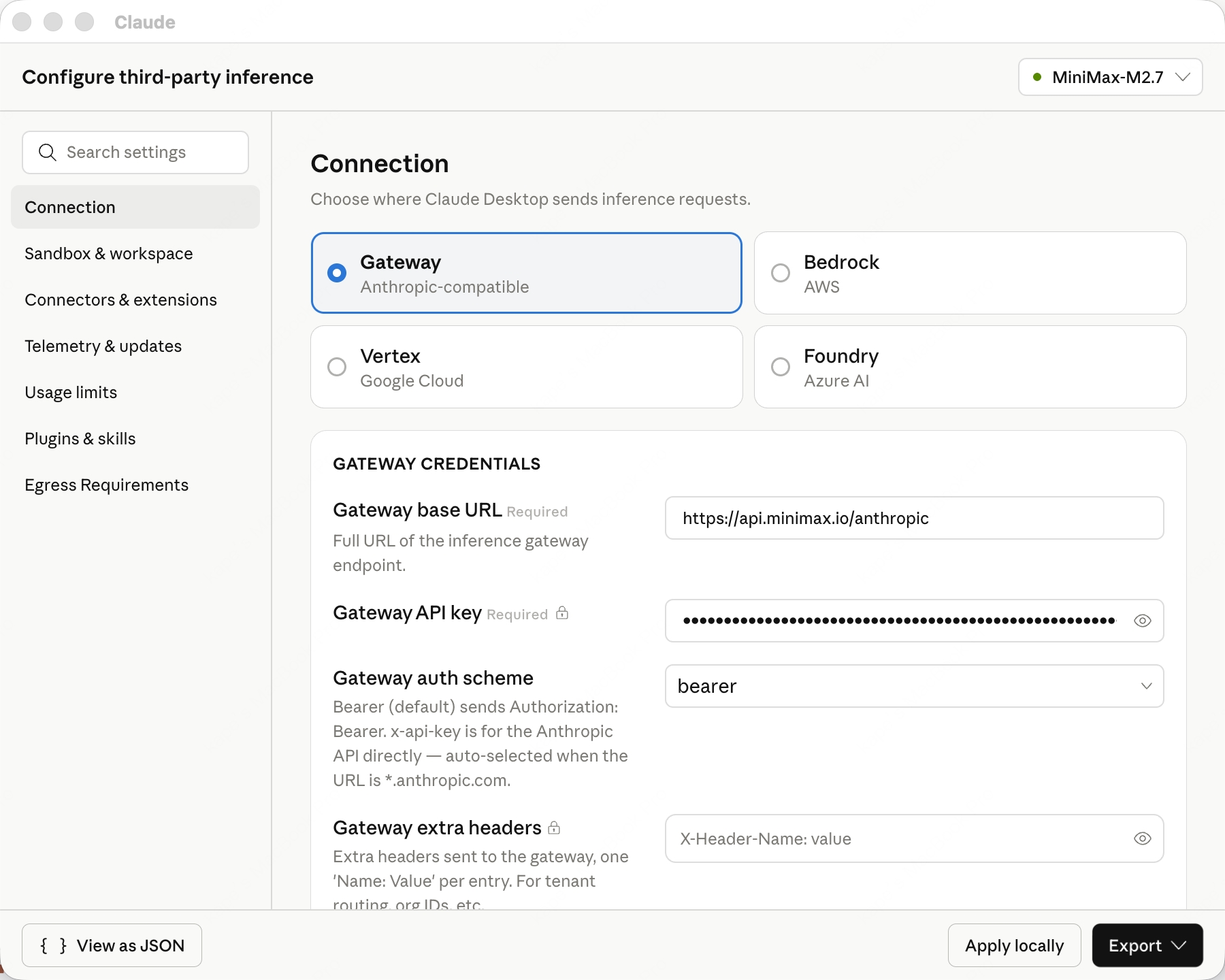
- inferenceProvider:
gateway - inferenceGatewayBaseUrl:
https://api.minimax.io/anthropic - inferenceGatewayApiKey: your Token Plan Key (prefix
sk-cp-…, get one here) - inferenceGatewayAuthScheme:
bearer
Xcode
Xcode is Apple’s official IDE for macOS, iOS, iPadOS, watchOS, and visionOS, now with built-in Coding Intelligence.
Install Xcode
Install Xcode 26 or later from the Mac App Store.
Add a Model Provider
Open Xcode → top menu Xcode → Settings → Intelligence → Add a Model Provider, choose the Internet Hosted tab, and fill in: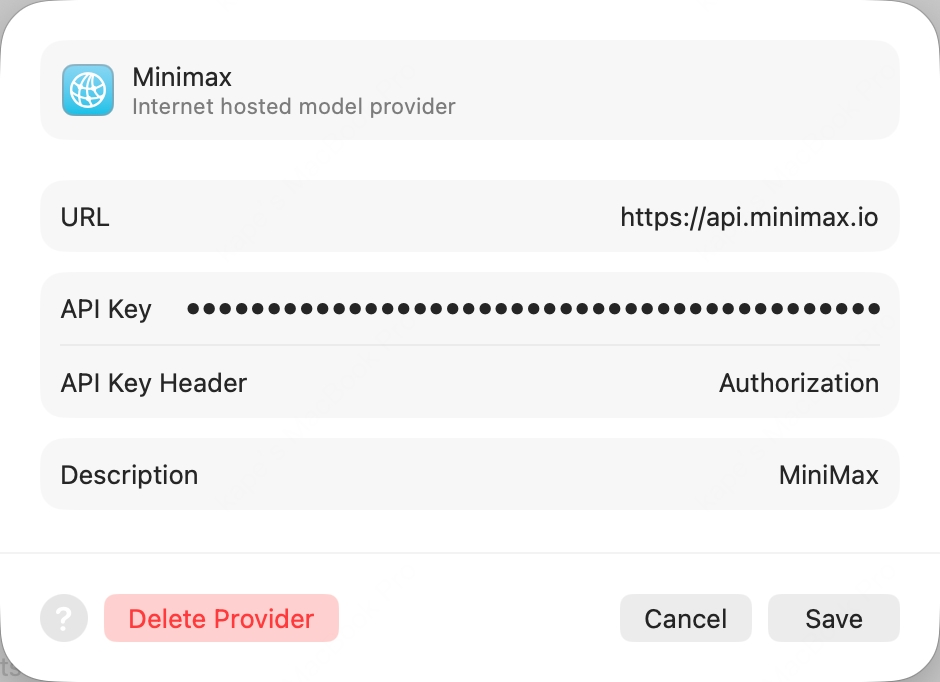
- URL:
https://api.minimax.io(bare host, no path) - API Key Header:
Authorization(override the defaultx-api-key) - API Key:
Bearer <your Token Plan Key>(the wordBearer, a single space, then yoursk-cp-…key — get one here) - Description:
MiniMax(any value)
Enable the model
Click Add. Back in the Intelligence pane, open the new MiniMax provider and enable
MiniMax-M2.7.Pi
Pi is an open-source TUI coding agent from earendil-works that talks to any provider through a unified LLM API.
Set env var and launch
Export your Token Plan Key (prefix
sk-cp-…) and launch Pi:Kilo Code
Kilo Code is an open-source AI coding agent for VS Code, supporting multiple LLM providers and MCP servers.
Configure MiniMax provider
Open Kilo Code → Settings: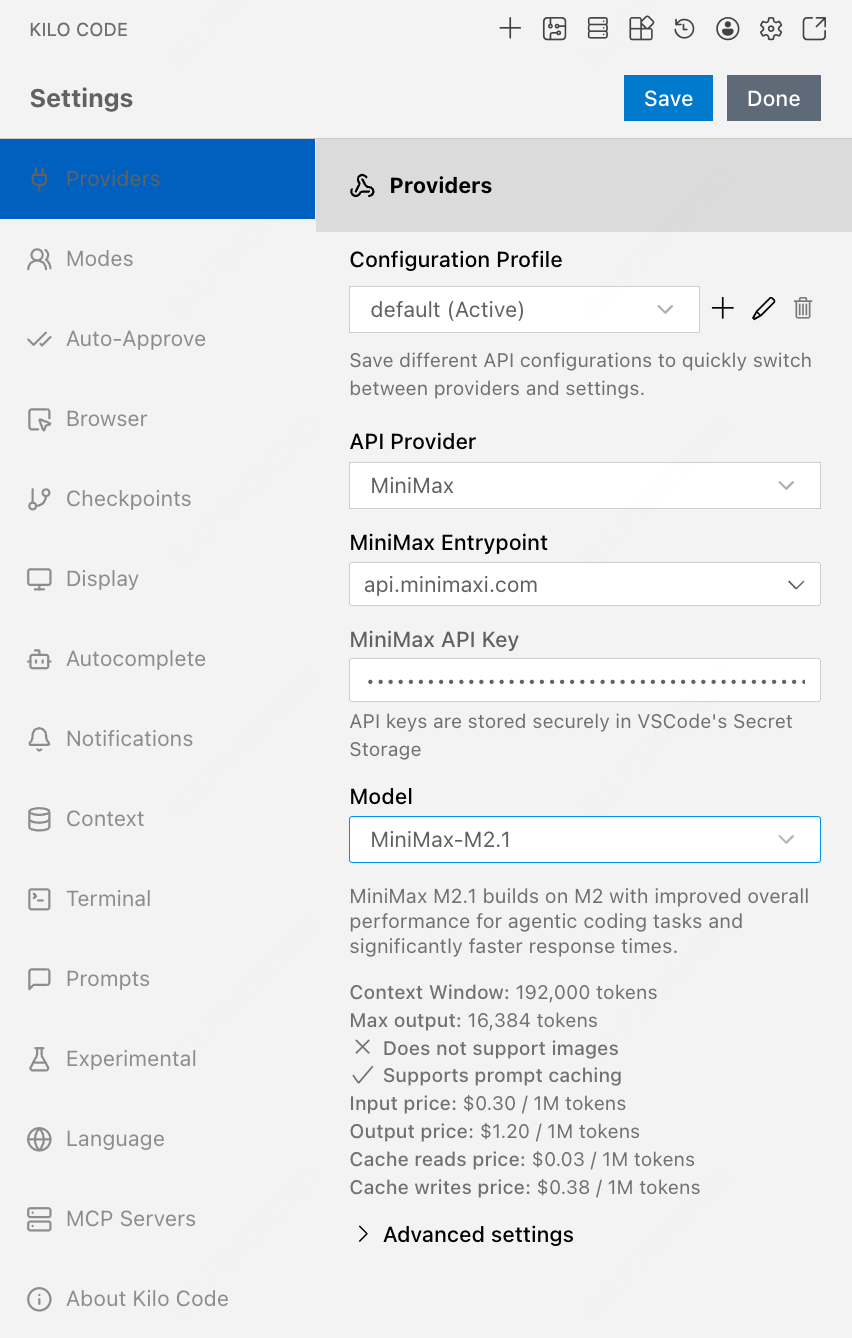
- API Provider =
MiniMax - MiniMax Entrypoint =
api.minimax.io - MiniMax API Key = your Token Plan Key
- Model =
MiniMax-M2.7
Roo Code
Roo Code is an open-source VS Code extension with role-specialized AI coding agents (architect, coder, reviewer).
Configure MiniMax provider
Open Roo Code → Settings, configure same as Kilo Code:
- API Provider →
MiniMax - MiniMax Entrypoint →
api.minimax.io - MiniMax API Key → your Token Plan API Key
- Model →
MiniMax-M2.7
Codex CLI
Codex CLI is OpenAI’s official terminal-based coding agent, written in Rust.
The latest Codex CLI has compatibility issues — version 0.57.0 is recommended.
Zed
Zed is an open-source, high-performance multiplayer code editor written in Rust by the Atom creators.
Install Zed
Install Zed per the official docs.
Add LLM Provider
Settings → LLM Provider → +Add Provider → choose OpenAI, fill: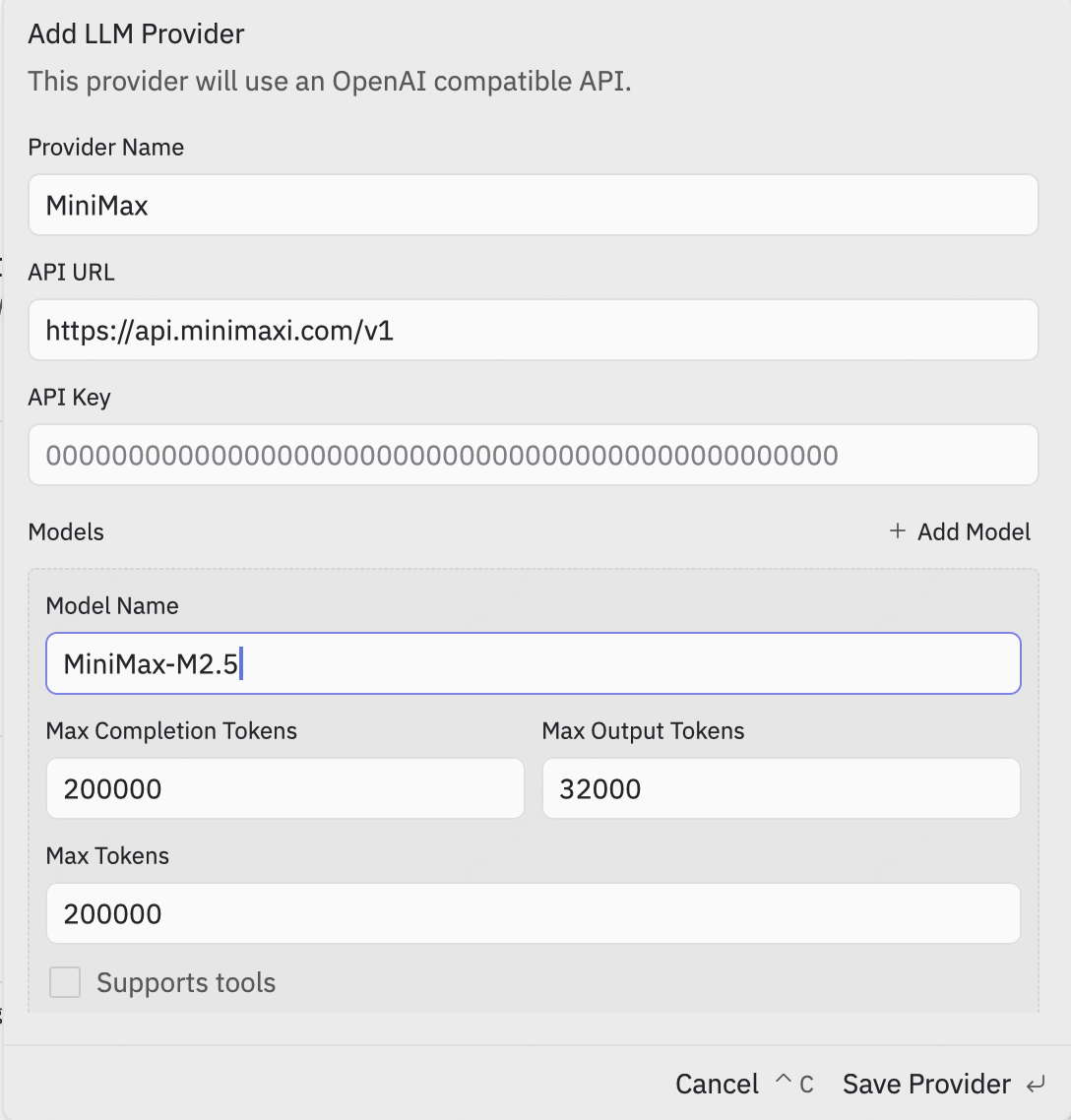
- API URL =
https://api.minimax.io/v1 - API Key = from Token Plan
- Model Name =
MiniMax-M2.7
Re-confirm API Key
Click Save Provider. Then back in the LLM Provider list, click the new MiniMax entry, re-enter the API Key and press Enter to confirm.
OpenCode
OpenCode is an open-source terminal AI coding agent by SST, with multi-provider support and LSP integration.
OpenCode has built-in MiniMax-M2.7 support — no config file needed.
Authenticate
Run
opencode auth login, then when prompted, search and pick MiniMax Token Plan (minimax.io), and enter your Token Plan API Key.Grok CLI
Grok CLI is an open-source terminal coding agent that connects to xAI’s Grok and OpenAI-compatible providers.
Not recommended for Agent workflows — use Claude Code or Cursor for best results.
Droid
Droid is Factory’s official terminal coding agent that integrates with IDEs and developer collaboration tools.
Qwen Code
Qwen Code is Alibaba’s open-source terminal coding agent optimized for the Qwen model family.
Launch and pick provider
Run
qwen in your terminal. Pick Third-party Providers → MiniMax API Key → region International.Enter API Key
Enter your API Key from Token Plan (prefix
sk-cp-…) and press Enter.Open WebUI
Open WebUI is a self-hosted, open-source AI chat platform with offline support, RAG, and multi-model runners.
Create admin account
Open http://localhost:8080 in your browser and follow the prompt to create a local admin account.
Add OpenAI Connection
Click the avatar (top-right) → Admin Panel → top Settings tab → left Connections. In the OpenAI row, click ➕ Add Connection, fill:
- URL:
https://api.minimax.io/v1 - Auth (Bearer mode): your API Key from Token Plan (prefix
sk-cp-…)
nanobot
nanobot is an ultra-lightweight open-source personal AI agent CLI from HKUDS, with chat channels, memory, and MCP support.
Configure MiniMax in one shot
Replace
sk-cp-... with your Token Plan API Key:OpenHands
OpenHands (formerly OpenDevin) is an open-source AI software-development agent by All-Hands-AI, with TUI, web GUI, and IDE integrations.
Configure MiniMax in one shot
Replace
sk-cp-... with your Token Plan API Key:LangChain
LangChain is the open-source framework by LangChain Inc. for building LLM-powered applications, with model adapters, retrieval, agents, and tracing.
Use MiniMax via the OpenAI-compatible adapter
Replace
sk-cp-... with your Token Plan API Key: